
Airtable - The Time Travel Log
As I work through the list of 10 Easy-Peasy Airtable Experiments, I realise that they really are easy. It takes longer to write about each experiment than it does to do it. Nevertheless, I will persist! In this lesson, I made a "Time Travel Log."
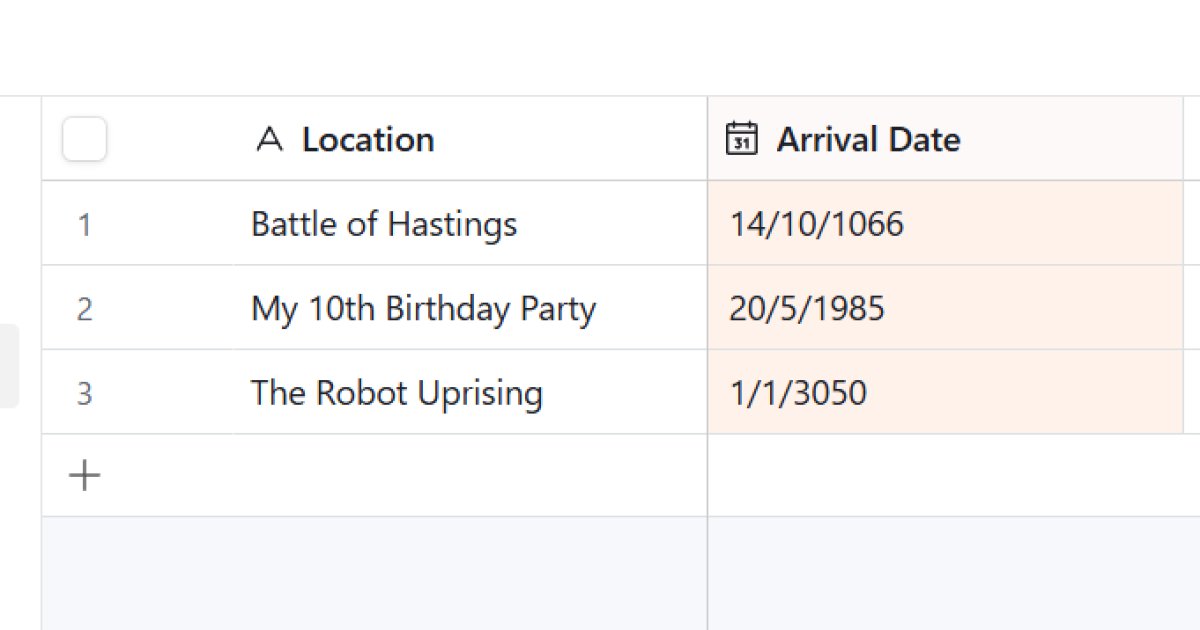 Airtable Time Travel Log
The Setup
The goal of this experiment was to sort data by date, which is handy if for when you time-travel from the present to the past to the future and so on in a non-linear fashion.
I entered three events into the database in a random order: "The Robot Uprising," "The Battle of Hastings," and "My 10th Birthday Party." At this stage, the records were just a list sorted by when I typed them, which made for a confusing narrative.
The Date Field
I added an "Arrival Date" field to anchor each event in time.
- The Robot Uprising: 3050-01-01
- The Battle of Hastings: 1066-10-14
- My 10th Birthday: 1985-05-20
Airtable's date picker is standard, but it understands the chronology behind the numbers. It knows that 1066 comes before 3050, even if I entered 3050 first.
Sorting the Timeline
With the data in place, I clicked the Sort button in the toolbar and selected the "Arrival Date" field (Earliest -> Latest), and the grid rearranged itself. As you would expect, it put The Battle of Hastings at the top, and the hopefully distant future Robot Uprising at the bottom.
Verdict
The distinction between "entry order" (when you typed it) and "logical order" (when it happened) is crucial. Using the Sort function ensures that no matter when you add a new event - whether it's yesterday or next century - it will automatically slot into the correct position in your timeline.